
Event Mode FAQ
What is Co-Pilot Event Mode?
Once enabled, this new feature allows the jukebox to temporarily halt music playback and prevents patrons from making paid music selections on the jukebox or via the AMI Music app during special events like sports broadcasts, karaoke, or trivia nights.
Why do I need Co-Pilot Event Mode?
This feature was developed to give you more transparency into when and why locations pause or shut off their jukebox. With Event Mode, locations can put music selection and playback on hold for a set time (15 minutes – 4 hours) and you will now be able to see a jukebox status that reflects this. It allows auxiliary audio options to be selected and used during events, and all promotions, including Ad Manager screens and paid ads (if applicable) will still run on jukeboxes and any connected TVs.
How is Co-Pilot Event Mode different from pausing the jukebox?
Event Mode is designed to temporarily restrict users from selecting and queuing music. Unlike the traditional pause feature, Event Mode will inform users via the UI or the AMI Music app that the jukebox is currently unavailable. App check-ins are prevented and paid selections are kept in the queue for playback, resulting in fewer complaints of unplayed music and lost money. Event mode can be programmed to last for the duration of your event, eliminating the need for staff to repeatedly “re-pause.”
How do I start an event?
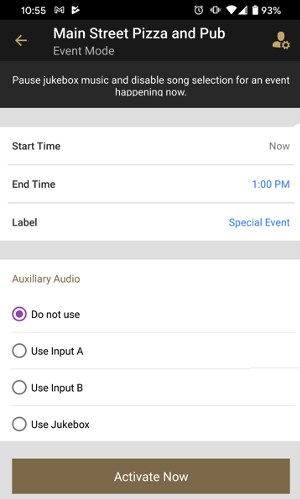
On the Control System screen, you will see an option for Event Mode. Once selected, it will give you the option to choose an End Time (Start Time is always immediate) and the ability to choose a label for the event. Next, select the Auxiliary Audio option that you wish to use, and tap Activate Now.
Can my Location Staff use this feature?
Yes. We encourage Location Managers and Location Staff to take advantage of this feature. No special Co-Pilot permissions need to be assigned to staff roles.
Can I use my auxiliary audio inputs when the jukebox is paused via Event Mode?
Yes, this is exactly what the feature was designed for. You will choose which audio inputs to use when Event Mode is initiated.
My locations don’t need auxiliary audio, can’t they just turn the jukebox off during events?
Abruptly shutting off or pulling the plug on the jukebox is discouraged. Apart from lost screen time for your Ad Manager promotions, a power down while the hard drive is communicating with the server could result in data loss and cause potential boot failure. It is important that locations keep the jukeboxes running during business hours so that music selection can resume at the end of the event and that you do not lose visibility of its status via Co-Pilot or amientertainment.net.
How do I know when a jukebox is paused via Event Mode?
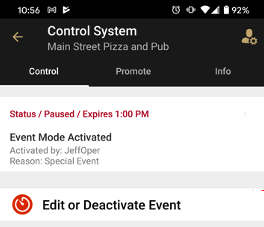
Within Co-Pilot, the Control System page for the jukebox will display a status of “Paused” as well as the scheduled deactivation time.
Will I be notified if my Location Staff pause the jukebox via Event Mode?
If you would like be notified whenever Event Mode is initiated at any of your locations, you can enable the Event Mode Entered option in Network Notifications. To do this, tap the Settings icon in the top right corner of your Co-Pilot screen, then tap Notifications and toggle it on from this page.
Can the jukebox be powered off when paused via Event Mode?
In order to prevent data corruption and potential boot failure, it is suggested that you do not abruptly shut off or pull the plug on the jukebox during Event Mode. However, if a shutdown or loss of power occurs, the jukebox will return to its Event Mode status—as long as it is still within the scheduled time frame—when powered back on.
Can I schedule Event Mode?
Not at this time. Event start time is always immediate.
Can I extend an event or end it early?
Absolutely. Once an event is started, there will be an option to Edit or Deactivate Event under the jukebox status on the Control System screen. Once selected, you can adjust the end time, event label, aux options, or you can choose to deactivate the event and resume music playback immediately. An event can also easily be deactivated immediately by pressing Play or Pause on the remote.
Will my Ad Manager advertisements continue to be displayed on the jukebox screen(s) and its connected television(s)?
Yes. This is one of the main benefits of using Event Mode. The jukebox screen will remain active and display all promotions.
What about paid ads? Will those run during Event Mode?
Yes. Any paid ads will be displayed on schedule, and ad revenue will continue to be generated.
What happens when a patron tries to select music on the jukebox?
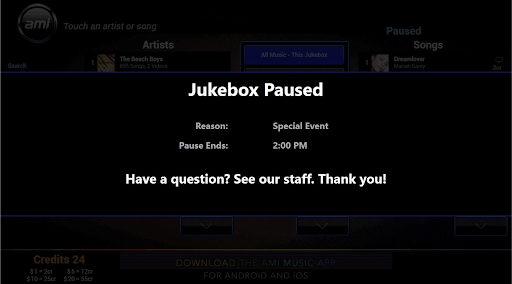
While Event Mode is engaged, the bill acceptor and credit card reader will be deactivated. Once the patron interacts with the jukebox UI, an onscreen message will be displayed informing them that the jukebox is currently unavailable for music selection.
What happens when a patron tries to select music using the AMI Music app?
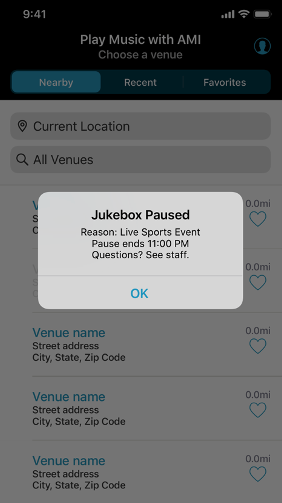
While Event Mode is engaged, patrons will not be able to check in to the location from the AMI Music app. They will be presented with a message informing them of the special event, along with the scheduled end time. Any patrons that are already checked in to the location will be unable to make paid selections and will also be shown the same notification.
What happens to any music that was in the queue?
All paid selections that were queued up before Event Mode was initiated will be played once the event is over. If a song was interrupted at the start of the event, it will replay in its entirety once music selection resumes.
What if I just want to pause the jukebox?
Currently, the default pause time is set to 10 minutes and locations will still be able to pause music playback (not selection) via Co-Pilot or the remote. In this case, the jukebox will utilize an enhanced pause feature which is automatically triggered once the pause surpasses 5 minutes. When this occurs, the jukebox functions the same way it would in Event Mode: music selection will be unavailable, patrons will not be able to make paid selections at the jukebox or via the AMI Music app, and onscreen notifications will be shown. Once the pause expires or is deactivated, song playback will resume and patrons will once again be able to add credits and select songs. It is important to note that auxiliary audio options are not available when the jukebox is paused.
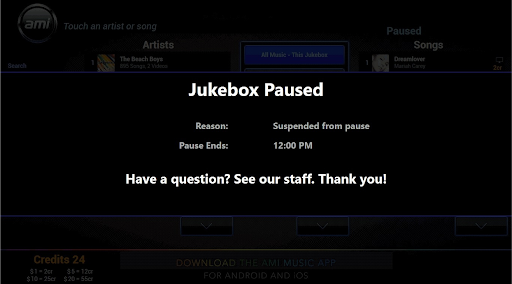
Will the remote continue to work as before?
Yes, with the following enhancements: The Input select button can be used to change the auxiliary input if Auxiliary Audio mode is enabled, and the Pause or Play button can be used to deactivate an event or extended pause.